This error means the bot cannot load the GeckoFX browser component (Geckofx-Winforms, Version=45.0.30.0) it uses to display and automate web pages. It usually happens when the GeckoFX runtime files are missing from the bot folder, for example when the download archive was not fully extracted, when an antivirus program quarantined one of the DLL files, or when files were moved after installation.
To fix it:
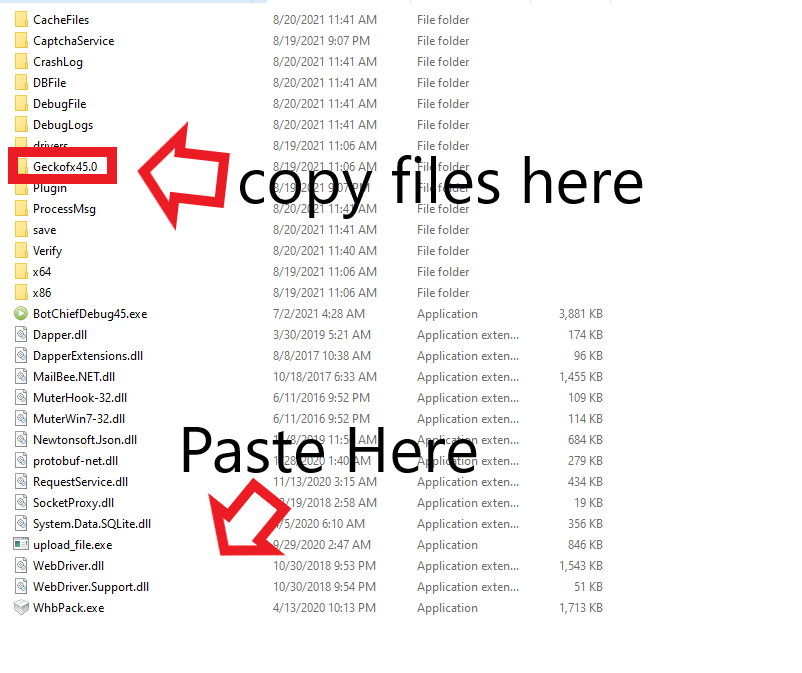
1. Go to the BotchiefDll folder inside the bot installation directory.
2. Open the Geckofx45.0 folder, copy all of the files inside it, and paste them directly into the BotchiefDll folder, so they sit next to the other DLL files used by the bot.
3. Run the bot again.
See screenshot below:
If the error continues after copying the files:
- Extract the full bot download to a fresh folder, and run the bot from that folder rather than from inside the zip file.
- Check whether your antivirus or Windows Defender quarantined DLL files from the bot folder, and restore them if it did.
- Right-click the bot executable and choose Run as administrator, then try again.
- If you cannot find your download link, see the help center article about the order confirmation email with license key and download link, or contact us through the contact page.